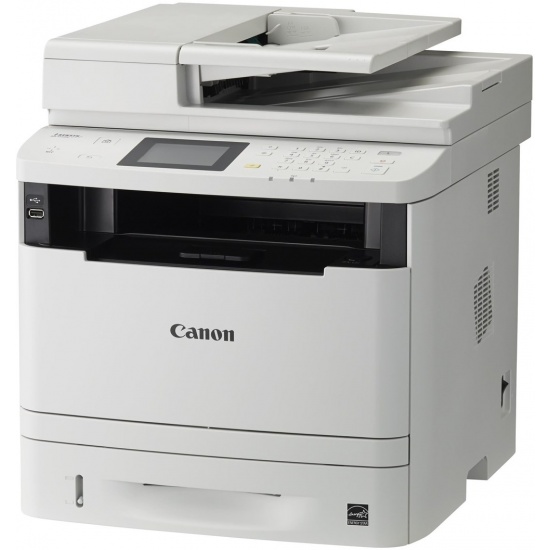
Canon i-Sensys MF512x A4 USB2.0 Gigabit LAN WiFi Multifunctional Laser Printer by Canon
- Be the first to review
- Item Number: 273-0194
- Part Number: 0292C025


No longer available. See alternative options
Key Features
- Canon i-Sensys MF512x Multifunctional Laser Printer
- 1200 x 1200 DPI
- 40ppm maximum print speed
- USB2.0 Gigabit LAN WiFi network connectivity
- Supports up to A4 page size
See product description
Details
The MF512x black and white A4 laser Multifunctional printer is tailor-made for enterprise workgroups needing fast, professional-quality output capabilities in a fully featured compact device built for flexible working.
Benefits
- High-quality printing at a rapid 40ppm
- Colour touch screen enables easy operation for all levels of user
- Supports Secure PIN printing
- Print from smartphones and tables with support for AirPrint Mopria and the Canon PRINT Business app
- Automatic duplex printing reduces waste and consumables overheads
- Quick First-Print cuts waiting time and helps maximise workgroup productivity
- Easily work with documents remotely via the cloud
- Device and output management capabilities
- Simple to maintain with convenient All-In-One Cartridges
Maximise productivity in the office
Small enterprise workgroups in search of a big productivity boost will find the MF512x A4 black and white laser Multifunctional printer an unbeatable choice. It boasts the powerful features and capabilities of a large office Multifunctional printer but in a compact device that’s easy to accommodate in small spaces. Busy teams will appreciate its fast, high-quality printing and copying at impressive speeds of up to 40ppm. The colour touch screen enables easy operation for all levels of user; while a 600-page paper capacity and Quick First-Print from start-up help your teams work more efficiently. Sensitive documents are protected using the Secure Print function that PIN-protects documents when printing from a PC or mobile device.
Flexible working
Thanks to the MF512x’s extensive support for Apple AirPrint (iOS) and Mopria (Android), your workgroup can print from any enabled device. They can also access a wide range of advanced features with the Canon PRINT Business app and can connect the device to a Google Cloud Print account in seconds.
Enhanced document sharing
Busy teams can gain welcome flexibility thanks to the MF512x’s MF Scan Utility (for PCs/laptops) and Canon PRINT Business app (for mobile devices) that enables seamless cloud integration. Teams can use their favourite cloud storage services – like Google Drive and DropBox – to capture, digitise and share documents at any time and from any place.
Smart networking capabilities
With a host of flexible networking capabilities, the MF512x makes a perfect addition to your enterprise network. Alongside WiFi and Ethernet connectivity, full support for PCL5e/6 and Adobe PostScript printer languages enable easy integration into your device fleet. Managed print services teams will find the remote service capabilities and support for Canon’s uniFLOW output system make for hassle-free management.
Affordable, sustainable ownership
When you depend on your Multifunctional printer for consistent quality and reliability, the MF512x won’t let you down, because Canon’s All-In-One Cartridge design replaces all key components at once with every toner change. Energy consumption and consumables costs are minimised thanks to low energy consumption in Sleep and Standby modes, automatic duplex printing, and a smart power-saving Auto Off feature.
Specifications
| OUTPUT TYPE | Black |
| PAPER SIZES | A4 |
| MAX PRINT SPEED | 40ppm black 20ppm duplex |
| WI-FI ENABLED | Wi-Fi |
| WI-FI STANDARDS | Ethernet,USB 2.0,Wireless LAN |
| MAX RESOLUTION | 1200 x 1200 DPI |
| DUPLEX PRINTING | Duplex scanning |
| TIME TO FIRST PRINT | 7.6 s |
| INPUT TRAY CAPACITY | 500 sheets |
| DIMENSIONS | 453mm x 477mm x 503mm |
| WEIGHT | 22.9Kg |
| SUPPORTED OPERATING SYSTEMS | Windows operating systems supported Mac operating systems supported Linux operating systems supported |